Did you set the static port outbound rules?
https://forum.autonomi.community/t/configuring-opnsense-for-autonomi-nodes/40886
1 Like
As mentioned above, it does sound like you have non static nat rules which will result it nodes from the outside talking back through the wrong ports.
1 Like
@d3su @anon75844067
I will post screenshots of my settings.
PORT FORWARDING:
OUTBOUND RULES:
(Cannot post screenshot “new user limitations”)
I couldn’t set my local ip in outbound rules, it would default to 192.168.50.0 after saving so I set to “any”
That’s all I have done in opnsense till now. No other settings touched.
Thanks
Followed this but still “Default deny/State Violation Rule” blocks everything.
Have you looked at the ultimate home node guide here on the forum by any chance? There’s an exact guide how to set up opnsense. I’m on mobile right now, but you should be able to find the topic here on the forum.
Edit: here you can find the settings: Autonomi ultimate home node guide (OPNsense - Linux) - Google Drive
1 Like
Did everything as per your guide, restarted PC and router.. Everything starts good, 20K peers connected and then suddenly “Default Deny/State Violation Rule” kicks in and then drops connections to less than 3K peers/200+ nodes.
EDIT: I am just gonna go back to old router and run less nodes.
My routers went offline for some reasons (still under investigation). However, after restarting them I see the NAT session table at: 2836144/10000000.
Nearly 3M NAT session tables entries with traffic sustaining at 1Gbps in both directions. 
5 Likes
The legend of 3M partyboi grows.
4 Likes
How often should I expect to earn any Attos if I’m just running one node on my laptop?
Nice, that’s something like 30K to 40K nodes?
1 Like
very very rarely, I’m afraid.
I’d say 20 is the minimum anyone should be running if the want to see regular ANT payments.
The emmissions (spit) pay out for every node you run, whether it is actually doing anythig useful or not. So the smart move is to run LOTS of nodes, that are at least able to answer, rather than optimising a few nodes to have fast reliable storage and bandwidth.
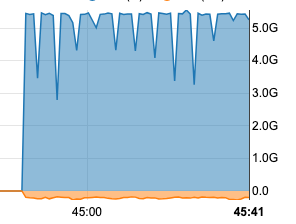
Surprisingly, even with the 1M to 3M NAT session state, 1M+ in steady state (due to antnodes), still able to pull data from internet at 5Gbps to 5.5Gbps without issues (like downloading the qwen3:235b llama models on local setup) etc.
Quite pleased  .
.
No, I wish, but no. It’s far less, I run less than 10000 nodes at the moment.
Keep flipping resources between different at home projects so things are always in a state of flux.
5 Likes
On a 12600H Cpu (hyper threading disabled), with 32Gb of ram running OPNSense with RSS enabled, I was hitting a wall at about 2.6M states (reported by OPNsense, but it seems there are 2 values, pf_nat, which about half this one, and pf_states, maybe pf_states is the number of firewall states? Number of NAT sessions seems to be the pf_nat value which is about the same as the sum of all my nf_conntrack_count of my connected devices).
This is due to the c0 core hitting 100% load (from interrupts according to my readings), whereas all other cores were sitting near idle.
This is weird since RSS was enabled and working (meaning interrupts from the NIC were distributed among all cores, which was the case from my checks), but it seems that the other cores were used in case of a spike in bandwidth (like running a speedtest).
I switched to my fortinet (which is more power hungry, less open source and more limited on features that I need), and I don’t have any more problems: currently at 2.2M NAT session (so equivalent to 4.4M states from OPNSense).
3 Likes
I modified my antnode code base (conducting a personal experiment).

Now at 4M NAT session tables with about 1400 ant nodes only with 1.6Gbps/1.6Gbps sustained.

6 Likes
Here are some additional tweaks while conducting a few personal experiments that I also used on my server:
# 1. Fix the critically low UDP minimum buffers
sysctl -w net.ipv4.udp_rmem_min=8388608      # 8MB minimum (was 4KB)
sysctl -w net.ipv4.udp_wmem_min=8388608      # 8MB minimum (was 4KB)

# 2. Increase max buffers slightly and network backlog
sysctl -w net.core.rmem_max=134217728        # 128MB (from 100MB)
sysctl -w net.core.wmem_max=134217728        # 128MB (from 100MB)
sysctl -w net.core.netdev_max_backlog=30000  # 30k (from 5k)
sysctl -w net.core.netdev_budget=600         # Process more packets per interrupt

# 3. Increase UDP memory limits
# Current: 144GB, 193GB, 289GB - Let's increase for 300k nodes
sysctl -w net.ipv4.udp_mem="50000000 75000000 100000000"  # 195GB, 293GB, 390GB

# 4. Set minimum UDP buffer sizes
sysctl -w net.ipv4.udp_rmem_min=26214400     # 25MB minimum
sysctl -w net.ipv4.udp_wmem_min=26214400     # 25MB minimum

# 5. Optimize for high throughput (optional but recommended)
sysctl -w net.core.busy_poll=50              # Reduce latency
sysctl -w net.core.busy_read=50              # Reduce latency
sysctl -w net.core.somaxconn=4096            # Increase listen backlog

echo 8388608 > /proc/sys/net/netfilter/nf_conntrack_max
Note: None of the above is any recommended advice or any suggested values (please treat above as just as an example off settings that can be tweaked).
4 Likes
Maybe next year, I may decide to get the 75 watt EYPC embedded series motherboards that are sampling now and expected to show up in Q1 2026.

It be nice swap out from very old servers to high density, ultra efficient on power consumption, and much more quieter too.
I could then make some serious use off the bandwidth while still meeting the power constraints off home as a farmer off antnodes,  .
.
Its nice to know I am still getting above the bandwidth I am paying for from the ISP.  .
.

Note: For the record, I haven’t been farming from home in months… but would love to get back into it at some point.
6 Likes
I am still paying a ridiculous amount for a business line, 5 ips and enough bandwidth to cover my needs 10 fold over.
Yet I too,
I keep telling myself to stop throwing money away on an unused expensive connection.
Why did you stop @Shu?
I am still paying a ridiculous amount for a business line,
I am paying about $190 including multiple static IPs and unmetered bandwidth. Not exactly cheap, but at same time, I think I am getting a good package for sure.
I keep telling myself to stop throwing money away on an unused expensive connection.
Same… but I plan to get back into farming soon, so didn’t want to downgrade severely and the upgrade again (don’t want to poke the ISP bear
Why did you stop @Shu?
Primarily because off noise from the computers when the cpu cranked up, but also because power bill was more than the earnings, and overall, I couldn’t justify running it (time included in continuous upgrades) as the price of ANT continued to drop.
I do know if I get even 1 to 2 servers off the above models, they are so much more efficient then like 5 to 10 off my computers… so I would easily be able to run probably 100k++ nodes within the same power budget and it not be that loud. I may have to buy a few more hard drives but I have enough slots on few off the servers to handle that extra storage requirement. I would not take shortcuts on the storage though, because once I set it up, I would just want it to work with minimal support burden. Farming isn’t my primary focus, but I do enjoy taking part in it, but do it right so minimal support burden for sure.
With automatic upgrades around the corner, I think life will get even easier for node operators especially on linux front. Setup once, and forget.
At the end of day, I wanted to utilize the resources I had (bandwidth, ample storage, high capacity routers, and spare servers) as equally as possible so efficiency is high.
3 Likes
I did not cover the cost of my internet connection, didn’t even need to wonder about the power bill 
1 Like
I kept one machine running with 5,000 nodes (plus one spare). After checking the numbers, I realized that if I sold my machines (RAM is very expensive right now, even the old one) and bought ANT instead (which I actually did in the opposite order), I would get more tokens than I could mine in over 5 years at the current rate.
So I don’t see how mining ANT is worth it for regular users anymore. The only real purpose is to generate new tokens that you can use to upload to the network without using an exchange for buying ETH, and then give those tokens to friends according to the method described here: Giveaways Made Easy: ANT Prepaid Upload Coupons
Check out the Impossible Futures!
4 Likes