##Running a publicly available crust node within a private LAN (same method can be applied to Vaults to make them join public network)
Configure your router to forward a specific port say 5484 to your local machine’s port 5484.
Use preferred port configuration option to start a crust_peer example on a specific port. Crust uses a configuration file with name format <application_name>.bootstrap.cache. This file should be placed in the working directory. So for crust_peer example, the file looks like this:
Start the first crust_peer on your local machine (on forwarded port to be publicly accessible to other nodes).
prakash@machine:~/rust/maidsafe/crust/target/debug/examples (rust_3)$
./crust_peer Listening for new connections on
Tcp(V4(127.0.0.1:5484)), Tcp(V4(192.168.0.10:5484)),
Tcp(V6([::1]:5484)), and listening for UDP broadcast on port 9999.
Didn’t bootstrap to an existing network - this is the first node of a
new network.
Enter command (stop | connect | send )>
Find your public IP address using your browser or command below curl -s https://4.ifcfg.me/
Note: Above method is just an example. Safe network will not use above method(s) to find public IP address.
Create a configuration for the second crust_peer to add the public address of first node.
Start second node from a different network. and send message to Node 1.
Node 2
Listening for new connections on Tcp(V4(127.0.0.1:47350)),
Tcp(V4(46.101.28.163:47350)), Tcp(V6([::1]:47350)), and listening for
UDP broadcast on port 9999. Bootstrapped to
Tcp(V4(223.114.175.96:5484))
Connected to peer at Tcp(V4(223.114.175.96:5484)) 1 connected node:
Tcp(V4(223.114.175.96:5484)) Enter command (stop | connect
| send )> Enter command (stop | connect
| send )>send 223.114.175.96:5484 Hello world
Successfully sent “Hello world” to Tcp(V4(223.114.175.96:5484)) Enter
command (stop | connect | send )>
Node 1 (Receiving 2 connections and a message from public network)
prakash@machine:~/rust/maidsafe/crust/target/debug/examples (rust_3)$
./crust_peer Listening for new connections on
Tcp(V4(127.0.0.1:5484)), Tcp(V4(192.168.0.10:5484)),
Tcp(V6([::1]:5484)), and listening for UDP broadcast on port 9999.
Didn’t bootstrap to an existing network - this is the first node of a
new network.
Enter command (stop | connect | send )>
Connected to peer at Tcp(V4(46.101.28.163:44791)) 1 connected node:
Tcp(V4(46.101.28.163:44791)) Enter command (stop | connect
| send )> Connected to peer at
Tcp(V4(46.101.28.163:44792)) 2 connected nodes:
Tcp(V4(46.101.28.163:44791)) Tcp(V4(46.101.28.163:44792)) Enter
command (stop | connect | send )>
Received from Tcp(V4(46.101.28.163:44792)) message: Hello world Enter
command (stop | connect | send )>
The above method may not sound great to some of the readers, as it involves configuring router.
The next step is UPnP integration in CRUST to allow automatic port mapping of crust nodes. Though this still require users to enable UPnP support in the router and has some security issues. This should be available hopefully this week itself.
To make this process completely automatic and without fiddling with router, we will need Hole Punching implemented in CRUST. Soon after uTP integration, we will have it in place.
I was under the impression that UPnP was a security disaster and should be disabled in all devices (on windows)
If your advocating trialing this over Public infrastructure, maybe a disclaimer may be prudent…especially given the information we leave on this forum and the possibility of a trail of crypto activities on the machines used to run this.
I’ll be waiting for the installers before opening up ports and the like…otherwise I might get hacked by the awesome ‘Hacking Team’ mob.
I’ll have to admit I’m a little misty-eyed. This was two desktop ubuntu 15.04 computers at completely different locations.
Now to work on the vaults.
mranderson@neo:~/crust$ cargo run --example crust_peer
         Running `target/debug/examples/crust_peer`
    Listening for new connections on Tcp(5050), and listening for UDP broadcast on port 9999.
    Bootstrapped to Tcp(V4(**.***.**:5050))

    Connected to peer at Tcp(V4(**.***.**:5050))
    1 connected node: Tcp(V4(**.***.**:5050))
    Enter command (stop | connect <endpoint> | send <endpoint> <message>)>
    Enter command (stop | connect <endpoint> | send <endpoint> <message>)>send **.***.**:5050 hello morpheus
    Successfully sent "hello morpheus" to Tcp(V4(**.***.**:5050))
    Enter command (stop | connect <endpoint> | send <endpoint> <message>)>
    Received from Tcp(V4(**.***.**:5050)) message: Hello Mr Anderson
    Enter command (stop | connect <endpoint> | send <endpoint> <message>)>
    Received 2 messages with total size of 39 bytes in last 10 seconds.

    Received from Tcp(V4(**.***.**:5050)) message: Boom goes the dynamite
    Enter command (stop | connect <endpoint> | send <endpoint> <message>)>
Excellent
Got chores to do ( What chores? A large Glenfiddich, thanks) then I’ll update my local and dropbox installs. If you are still about perhaps we could try connecting?
It was also the first time I have used an IRC type thing for online chatting. Thanks to the people who made it easy to do. We had four people from different areas on at the same time (one was my friend that doesn’t even have a membership to the forum, but love networks…yea that’s another whole thread)
My mind is going crazy with possibility after seeing this dream becoming reality. I left crust running all night and it still is going like a champ.
I also got the vault built and everything tested perfect. Did cargo run (imcluded above **.cache file) and it looked like it was doing something, but not sure what. Is there anything else I can do?
DM me with your ip and port please. If yor friend is up for it as well then send his too.
There is a slight security risk in this (OK OK the purists will tell me there is no such thing as a slight security risk).
I’ll keep a list of nicks and ip:ports - must check if I can put comments inn the bootstrap.cache file for now.
I’ll put this on a passwd-protected page - Send me your details and I’ll send you the password if you are happy with this for now.
Screenshots with IPs blanked out would be good for getting others interested especially if you can show 3 or 4 different connections.
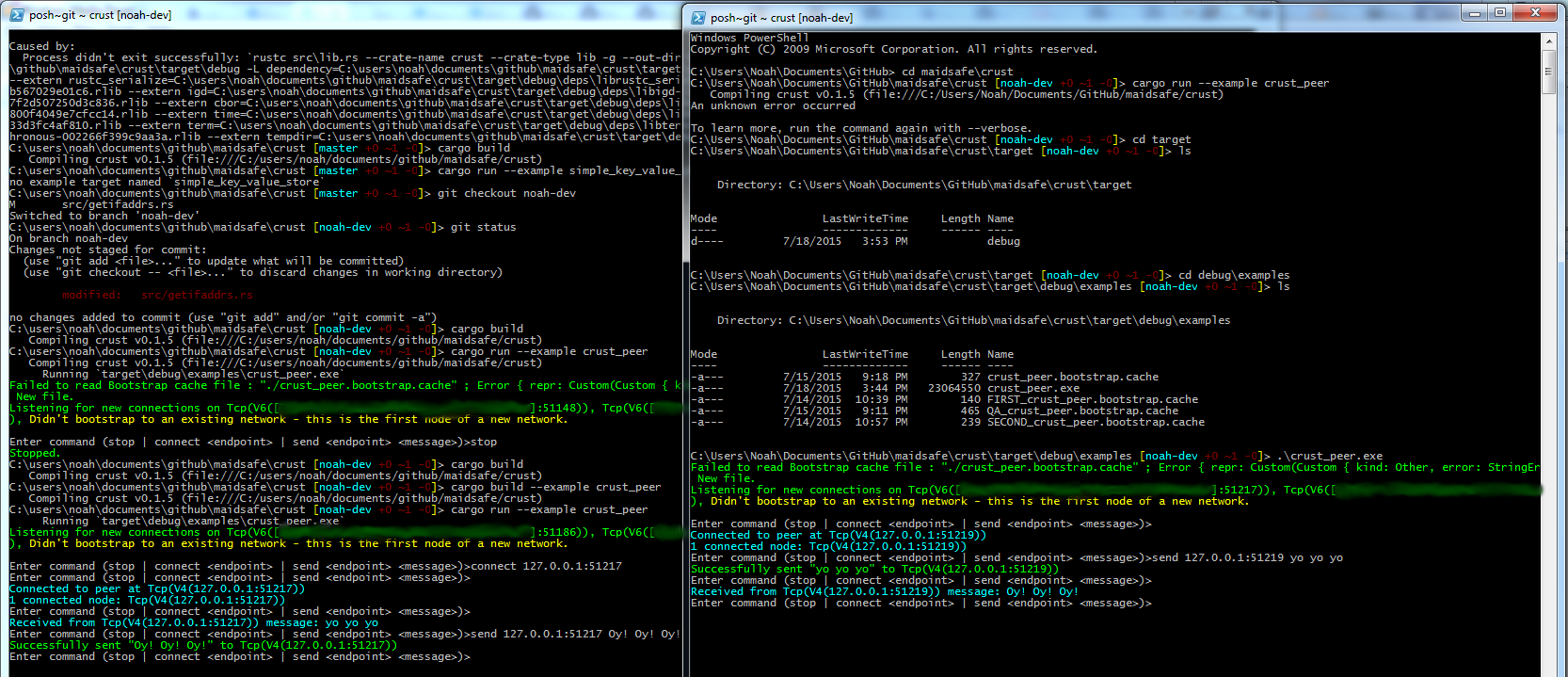
I have been able to “get it running” on Windows 7 32-bit, but this error is the type I have to fix to compile:
Compiling crust v0.1.5 (file:///C:/users/noah/documents/github/maidsafe/crust)
src\getifaddrs.rs:254:40: 254:60 error: trivial numeric cast: u32 as u32. Cast can be replaced by coercion, this might require type ascription or a temporary variable
src\getifaddrs.rs:254 ifaddrs = libc::malloc(buffersize as size_t) as *mut IP_ADAPTER_ADDRESSES;
^~~~~~~~~~~~~~~~~~~~
src\lib.rs:28:24: 28:45 note: lint level defined here
src\lib.rs:28 #![warn(trivial_casts, trivial_numeric_casts, unused, unused_extern_crates, unused_import_braces,
^~~~~~~~~~~~~~~~~~~~~
error: aborting due to previous error
Could not compile crust.
This code assumes that in the current environment size_t will not equal u_long in definition, but they are both defined as u32. Since lib.rs adds a warning for trivial_numeric_casts, it doesn’t compile without modification.
I have modified the statement in getifaddrs.rs line 247 to this:
#[allow(unsafe_code,trivial_numeric_casts)]
Now it allows this trivial cast, believe only in the context of the getifaddrs() method, where the issue lies on my platform.
@MrAnderson I would love to connect to someone’s network, are you connecting to an IP:port posted here or a privately communicated one?
Thanks -Noah
[Edited to add “definition”, a missing work in the 3rd paragraph (after the terminal output).]